Options

Control behavior and capture

The Options tab places behavior and capture settings on the left, with Customize and visual styling on the right.
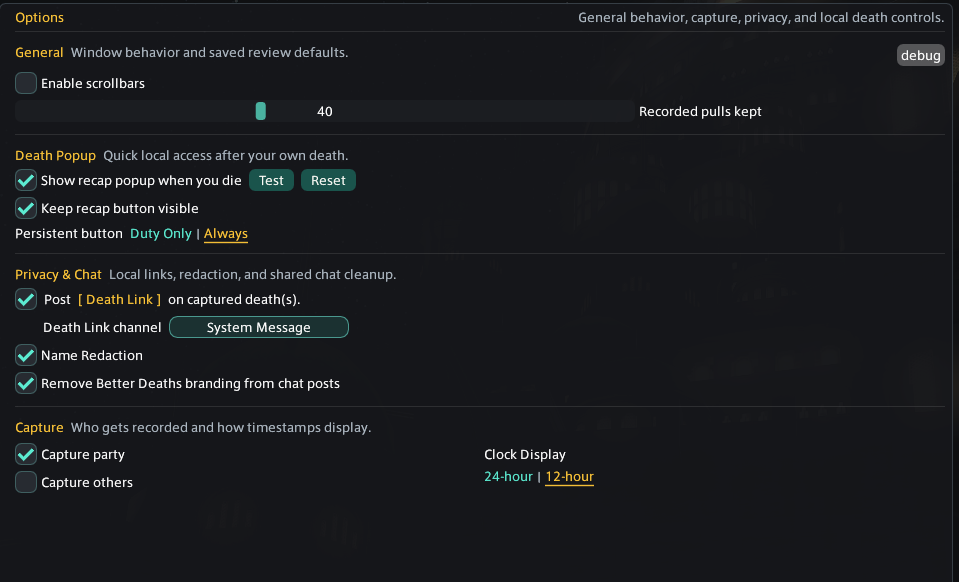
GeneralShow scrollbars and choose how many completed pulls are kept locally.
Death PopupEnable, test, reset, and choose the persistence of the post-death recap button.
Privacy & ChatPost clickable death links, choose their local display channel, redact names on screen, or remove Better Deaths branding from chat posts. Death Link channels are local UI channels, not party or public chat.
Capture partyRecords party deaths, including your own character.
Capture othersAlso tracks non-party player characters visible to your client.
ClockUses 24-hour or 12-hour local time in recorded-pull descriptions.
Better Deaths Options showing General, Death Popup, Privacy and Chat, Capture, and Clock Display controls
The left side of Options groups behavior, capture, privacy, chat, and local death controls.

Customize

Shape the review workspace

The Customize half of Options controls how much review information is shown, how it is ordered, and how the plugin fits your UI.
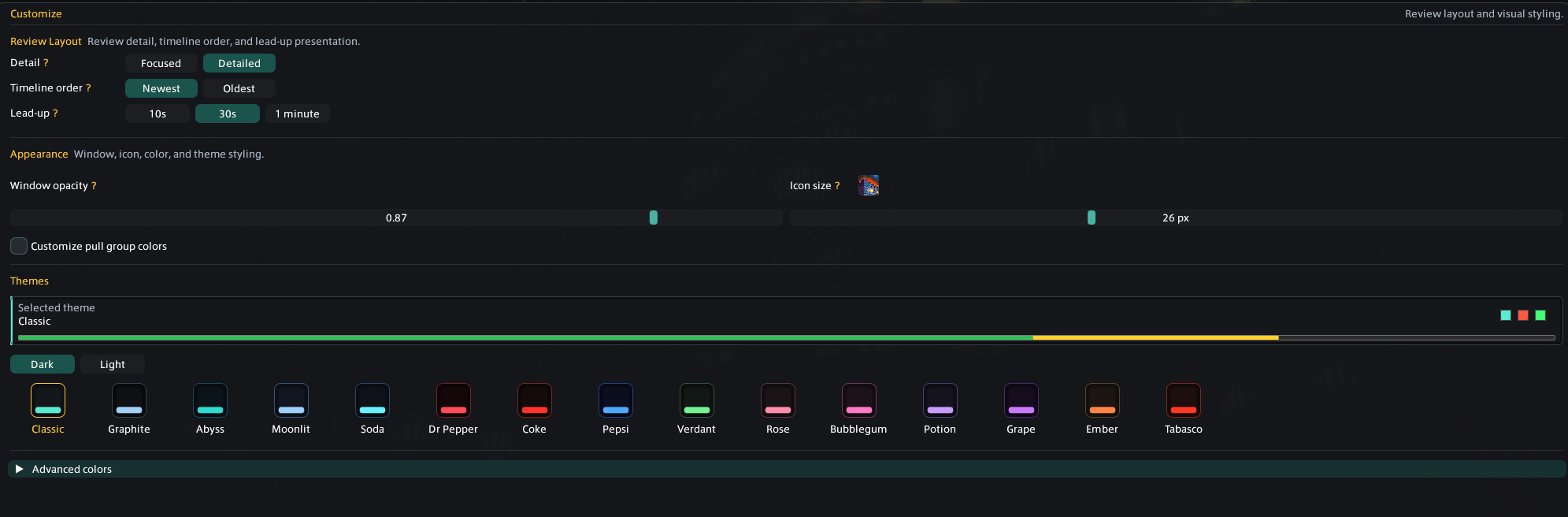
Review LayoutFocused or Detailed, Newest or Oldest, and a 10-second, 30-second, or 1-minute lead-up.
AppearanceMain-window opacity, Review icon size with a live example, same-instance pull group colors, and Dark, Light, or Style themes.
Style themesUnder Options > Customize > Themes, choose Style for Sakura or Confection, or browse the Dark and Light palettes. Themes apply to the main window and both widgets. The DPS Meter uses a matching compact header and role-colored rows, with alternating shades to separate neighboring players. Damage share stays a number.
Animated detailsMeter headers use theme-matched backgrounds, such as falling Sakura petals, rising soda bubbles, floating sweets, clouds, or citrus details. Sakura and Confection also decorate the main window. Animation is off by default; enable Animate details for motion, or leave it off for still backgrounds. Effect strength controls both visibility and density; zero hides the effects. Reduced-motion preferences are respected. Widget previews use the same styling, and each widget keeps its own background opacity.
Advanced colorsStarts from the selected built-in theme, then lets you replace individual UI, event, HP, shield, and status colors. It can be reset back to the selected theme.
Fun ModeAn opt-in presentation mode in the top-right header. It changes playful wording and exposes the Ligma echo-chat button, but recorded information and calculations stay unchanged.
Better Deaths Customize showing Review layout, timeline order, lead-up duration, opacity, icon size, pull colors, themes, and Advanced colors
Customize keeps Review layout and visual styling in one place.

Data & privacy

Know what is stored and shared

Saved locally

Configuration and recorded pulls stay on your computer. Pull files can include names, jobs, duty details, timing, positions, waymarks, HP, shields, events, actions, statuses, and mitigation context.

Storage is visible

Data shows the number of saved pulls, detail-file count, recorded-pull size, total plugin folder size, debug-file size, and the local folder path.

Name Redaction is visual

It protects screenshots and shared display. Existing local pull files may still contain the original captured names.

Chat sharing is optional

Death links are Dalamud chat payloads that help another Better Deaths user find a matching local recap. They are not web uploads.

FFLogs Analyzer is the network exception

When you choose the FFLogs source, the report code is sent to WTF.DIG's service so it can retrieve that report from FFLogs. Local Pull analysis does not use that lookup.

Feedback opens your browser

The feedback button asks for confirmation, then opens the Punish Discord invite. Better Deaths does not attach pull data to that link.