Follow damage in duties and the overworld, expand each player's abilities, and return to saved combat encounters without replacing the live view.
Open Widgets > DPS Meter and enable Show DPS meter widget, or toggle it with /bdm. Hiding the widget does not stop capture or reset the encounter. The separate window follows the current encounter and keeps the last result visible when combat ends. Drag its title bar to move it, or a lower corner to resize it.
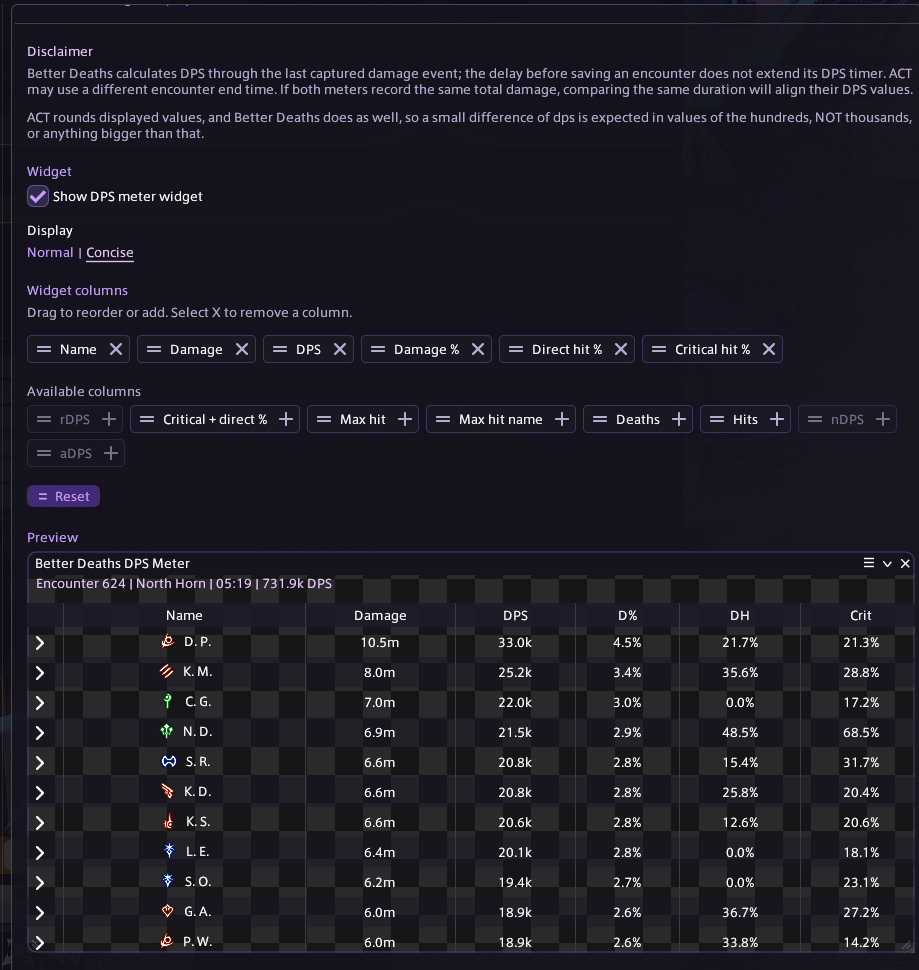
Column controls and the encounter preview in Concise display. Player names appear as initials, while damage and DPS use shortened values.
The default columns
NameThe job icon and player name share one column. Name Redaction replaces every captured player's name with a numbered Player label, including nearby players and alliance members. It also applies to hover text and saved-encounter previews.
DamageThe player's recorded damage total for the encounter.
DPSRecorded damage divided by the captured encounter duration. Players are ordered by damage contribution over that shared duration.
Damage %The player's percentage of the total damage shown in the meter.
The arrow beside a player expands an ability breakdown. The meter includes nearby capturable players, not just your party, including players from other alliance parties. It cannot display events the game has not made available to your client.
Customization
Choose what the widget shows
Background opacityThe slider under Widget changes only the DPS Meter background and its preview. It is independent of the Death Widget.
Icon sizeAdjust job and ability icons from 12 to 32 px. The meter's rows and column sizing follow the selected size. Death Widget icons are controlled separately.
AddClick an available column's + or drag its tile into Widget columns.
ReorderDrag an active column tile to change its position.
RemoveSelect the tile's X. At least one column remains active.
Restore defaultsThe Reset button in the column settings restores the default columns. It does not reset damage or delete encounters.
Additional columns
Critical hit %The recorded critical-hit percentage.
Direct hit %The recorded direct-hit percentage.
Critical + direct %The percentage of eligible hits recorded as both critical and direct.
Max hitThe largest recorded hit amount.
Max hit nameThe ability associated with that largest hit.
DeathsDeaths recorded for the player during the encounter.
HitsThe recorded hit count.
Normal
Uses full player names and full damage and DPS values, subject to your name-redaction setting.
Concise
Uses initials and short damage and DPS values with decimal precision, such as 184.8k or 2.4m. Damage share remains a percentage.
Column widths share the available window space and adjust when you resize it. The same column order and display mode apply to the widget and its preview.
Encounter history
Review a result without changing the live meter
Floating widgetShows the live encounter, or the most recent result when there is no current fight.
Encounters listStores the latest 40 recorded combat encounters locally. Select an encounter to inspect it in the preview. The side-panel arrow expands or collapses the list.
PreviewUses the selected encounter and your current widget settings. Selecting history does not replace the floating widget's live data.
Before your first encounterThe preview shows redacted example data so you can adjust the layout outside combat. The example is not added to your encounter history.
Combat encounters are separate from the death pulls listed in Review. An encounter can contain useful damage information even when nobody dies. Display redaction does not remove original names from locally saved records.
Combat boundaries
Automatic saving and manual resets
Overworld combatThe meter starts when eligible damage is captured. It saves the encounter after three seconds without combat or new damage from captured players. That wait does not extend the DPS timer.
Manual resetIn the overworld, use /bdr or the curved-arrow button beside the widget's encounter heading. Its tooltip reads New encounter. It saves the current result and starts fresh on the next damage without deleting history or forgetting active effects.
Inside dutiesThe manual reset button is hidden and /bdr cannot reset the meter. Existing wipe, restart, and combat-end handling controls encounter boundaries.
After combatThe last result remains visible until another encounter begins. Your own death does not end an overworld encounter while other captured players are still fighting.
Reading the numbers
Compare the same encounter and duration
DPS depends on both the damage total and the duration. A longer measured encounter can show lower DPS even when the damage total is identical. Compare the same fight, player, metric, and time window before treating a difference as missing damage.
Personal DPS, not raid-buff-adjusted DPS
The visible DPS column reports personal damage over the encounter duration. rDPS, aDPS, and nDPS are currently unavailable widget columns.
Displayed numbers are rounded. Some damage-over-time values require estimation, and incomplete captured information can affect totals. Concise display changes how numbers are presented, not the underlying encounter data.
 Better DeathsHelp Center