Replay

Beta

See the pull in motion

Replay uses captured positions, waymarks, statuses, and mechanic data to rebuild the attempt on a timeline.

Navigate the pull

Play or pause, scrub the timeline, and zoom or pan the arena. The selected death gives you a useful starting point, but the replay covers the recorded pull.
Party HP

Show HP opens the resizable Party HP window with job icon, name, HP percentage, and shields. The window updates with replay time.

Active Effects

The resizable effects window can show Mitigations, Debuffs, or a split view. Timed effects count down and disappear when their captured duration ends.

Playback and timeline controls

Play / PauseStarts or stops the replay from the current timeline position.
ResetReturns to the beginning of the captured replay range and stops playback.
DeathReturns to the currently focused death. Review's Open in Replay chooses that death automatically.
0.5x / 1x / 2xChanges playback speed without changing the captured timing.
TrailsShows recent movement trails behind actors.
TimelineClick or drag to scrub. Skull markers are recorded deaths; hover for player names or click a skull to focus that death and jump just before it.

Arena and display controls

Resize

Drag an arena corner to set the replay size. The chosen size is saved. The canvas and status panels keep separate stored sizes.

Zoom and pan

Use the Zoom slider or mouse wheel over the arena. While zoomed in, drag the arena to pan. Returning to 1x recenters it.

Focus a player

Click a player token to keep that actor's label visible. Click empty arena space to clear the focus.

Labels and waymarks

Show names respects Name Redaction. Show classes adds job abbreviations. World marker opacity changes A/B/C/D and 1/2/3/4 visibility.
Party HP and Active Effects

Enough side spaceParty HP and Active Effects stack vertically beside the arena as separate, independently resizable panels.
Limited side spaceThe panels move over the arena and share one resizable container by rows so neither view consumes the entire replay.
Party HPShows job icon, redacted or captured name, HP percentage, shield percentage, and a synchronized HP/shield bar. Dead players show 0.
Mits modeShows active captured mitigation, its owner, remaining time, and related child effects when available.
Debuffs modeShows every active captured player debuff, stacks, owner, and remaining duration when one exists. Untimed debuffs disappear when the removal was captured.
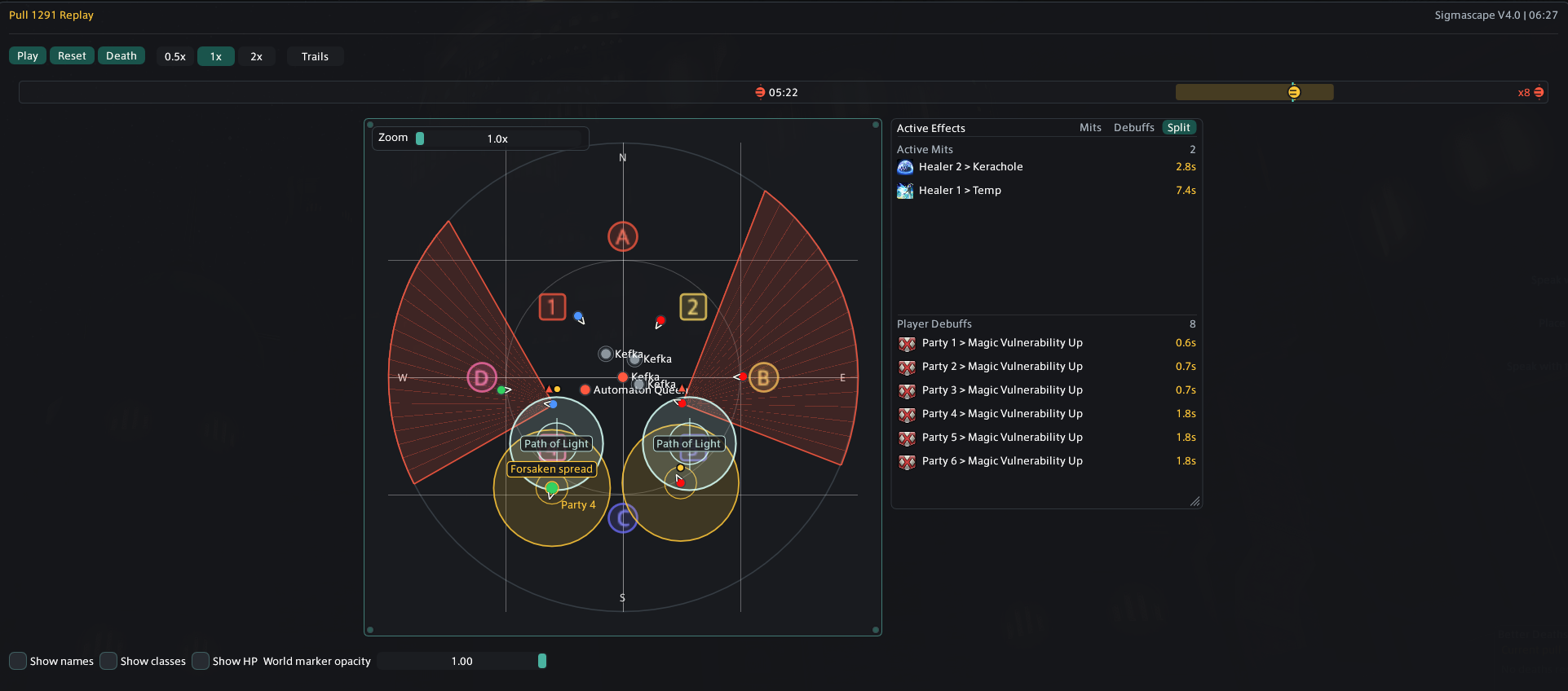
Split modeShows mitigations above debuffs. Drag the internal horizontal divider to change their share; the ratio is remembered.
Better Deaths Replay showing playback controls, death markers, a Forsaken arena snapshot, and Active Effects in Split mode
Replay keeps the arena, mechanic drawings, scrubber, and synchronized Active Effects in one view.
Why a replay may look incomplete

Supported encounters receive richer mechanic drawings. General replay still uses the data your client captured, but it may not know a mechanic's exact name or shape. Older pulls cannot gain fields that were not recorded when they happened.